
Pick your subject
Choose one person, pet, character, or costume. A clear single-subject photo works best.
THE BURNING BRIDGES VIDEO TOOL
Upload one photo and get the Drake Burning Bridges trend video: a 15-second 16:9 party clip with chandelier light, a handheld camera and the crowd finish. No prompt writing required.
One photo in. One party video out.
Add your photo
Use one clear, front-facing photo with a well-lit face. JPG, PNG or WebP up to 5MB.
Upload your photo (0/1)
Generated with Seedance 2.0
Your photo stays the main character
The prompt protects the face, hair, clothing and accessories from your reference photo while the party moves around them.
This loop is a sample render made with the tool from one uploaded photo - no stock footage, no external reference clip, no real person.
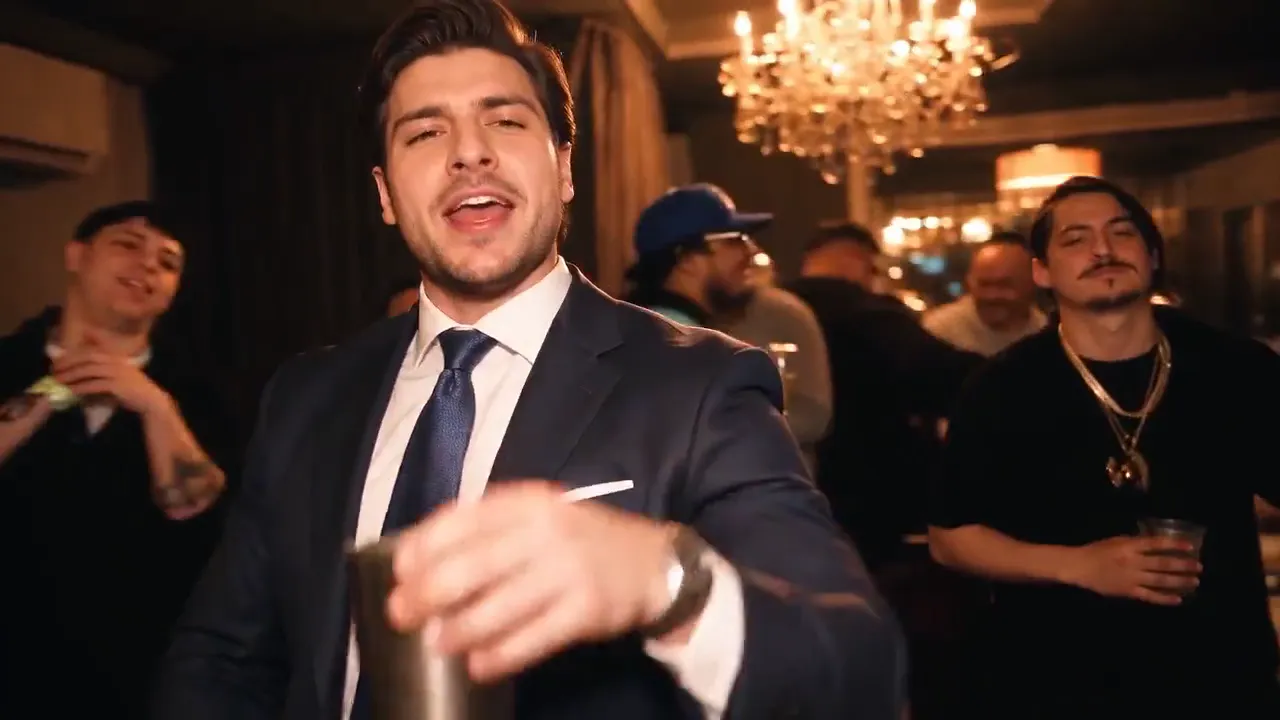
The trend comes from Drake's Burning Bridges and turned into a format anyone can join: one person, rapped straight to a handheld camera in a chandelier-lit room. It travels because the sequence is instantly recognisable - and everything generated here is an original scene built from your photo, never a copy of the source footage.
What made it a trend rather than one video is that the scene carries the recognition. The room, the light, the cup and the gesture sequence are the same in every version, so a clip still reads as the trend even when the face is completely new. That is what makes it reproducible from a single photo.
Go deeper on this trend
Real renders from the one-photo workflow: the subject comes from your photo, the room, the crowd and the camera stay the same. Only the person changes from clip to clip.
A single portrait walks straight into the chandelier room - same face, same suit, cup in hand, crowd already leaning in.
Illustrated and 3D characters work the same way: markings, outfit and silhouette hold steady through the whole gesture sequence.
The whole room works the same way: your subject stays the lead with the cup, while two friends lean in on either side and the party carries the beat.
Choose one person, pet, character, or costume. A clear single-subject photo works best.
Use one clear, front-facing photo with visible eyes and even light. The subject from that photo stays the lead while the fixed scene and crowd are generated around them.
Generate the party video. Your video is rendered in the background and appears in your creations.
Our generator runs one fixed prompt, so you never have to write one. If you would rather drive another video model yourself, this is the exact wording - it is what keeps the room, the camera move and the subject's identity in place.
Create the viral Burning Bridges party video from the person in the reference photo. Preserve their face, hair, clothing and accessories. Place them in a crowded chandelier-lit party room with warm amber light, wood paneling, a handheld close camera, a stainless-steel cup in one hand and friends leaning into frame. Use the recognizable sequence: mouth along to the beat, flick toward the lens, raise the cup, point at the camera, touch the collar, turn toward friends, then finish with the group laughing and hands up. Keep the motion natural, energetic and cinematic. Do not add text, logos, watermarks or extra faces replacing the main subject.A clear single-subject source photo gives the model one strong visual identity to preserve. This produces a more stable character than a group photo or busy image.
The party scene backdrop is original and contains no performance footage. Only upload images and audio you have permission to use.
Each pack adds credits to your balance. One 15s 720P render spends 100 credits, and purchased credits never expire.
Try the trend with one finished video.
1 video · ≈ $9.90 each
10015s 720P render each
Three renders to test different photos before you commit.
3 videos · ≈ $6.63 each
30015s 720P render each
For creators posting the trend across several accounts.
5 videos · ≈ $5.98 each
50015s 720P render each